How to Manage System and User Config
If you work with Linux or Unix, you learn early that everything is a file. That matters most when it comes to configuration. This post is about how to keep personal config and scripts in one place, in a git repo, synced across every machine, using GNU Stow, and the extra headache that comes from root-owned files under /etc.
Config Files Are Just Text #
Everything is a file, and on Linux that file is plain text, not binary. You can read it and understand it without any special program. Compare that to Windows, which stores configuration in the Registry:
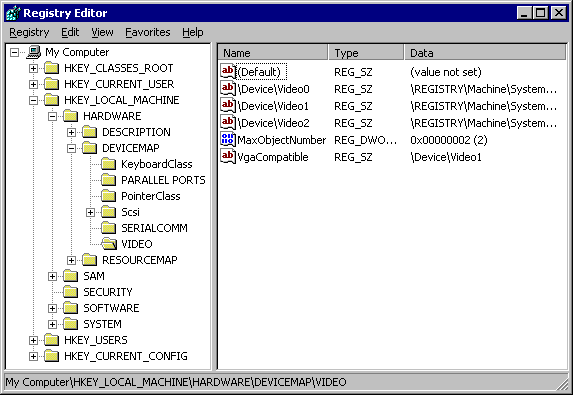
a single database you can only touch through tools the OS gives you. You can’t just open it and edit it by hand. On Linux there’s no single registry. Config lives in plain text files, which is exactly the kind of thing a tool like git is good at tracking: store it in a repo, see its history, roll back a change that broke something, share it with someone else. None of that requires reverse engineering anything, it’s just text.
The catch is that config isn’t sitting in one folder waiting to become a git repo, it’s scattered all over the filesystem. Stow is what closes that gap, more on that later.
The Problem: Config Scattered Everywhere #
Over the years I found myself editing more and more files under my home directory: config files and scripts that weren’t part of any project, just things I needed to run and configure my own machine the way I like it. That created two problems. First, I’d forget what I’d changed and where. Second, none of it followed me anywhere, not between machines. Because I keep a dedicated home partition, most of it did survive a plain reinstall, just not when I actually swapped the disk itself, a new laptop, a bigger SSD for the desktop, that kind of thing. I regularly use two main machines, a desktop at home and a laptop when I travel, plus a handful of remote servers I connect to over SSH where I want the same config and scripts available.
Two examples make this concrete. The first is ~/.bashrc, the script that runs every time a new shell opens for the current user. It’s where you configure your shell and command line to your liking, and I have plenty of edits in mine. I want it synced across every machine I use, version controlled, and safe even when I wipe a disk and start with a fresh home directory. The second is ~/.gitconfig, which holds global git settings shared across every repo: my diff tool, my editor, even a custom git credential helper I wrote myself. Both files need to be shared across machines and survive reinstalls. So how do you actually do that? Is there a standard way?
Dotfiles: The Standard Fix #
Yes, there is, and the community has a name for it: dotfiles. Search around and you’ll find many examples of other people’s dotfiles repos, plus tools built specifically to manage them. A dotfiles repo is just a git repo holding your custom config and scripts. It’s a personal thing, one repo per person, not something a team shares.
The obvious question is who actually moves those files from the git clone into the right place. You could clone the repo straight into your home directory, but then you’d need to maintain a giant .gitignore to hide everything in $HOME that isn’t yours, which is more trouble than it’s worth. Instead, clone it somewhere else, usually ~/dotfiles, and let Stow do the work. Stow creates symlinks between the files in the repo and their real locations. If you have ~/dotfiles/.bashrc, stow creates a symlink at ~/.bashrc pointing back at it.
Managing Config With Stow #
Stow’s job is simple: it takes whatever you’ve got under ~/dotfiles and recreates the same structure under your home directory, one symlink per file, at the exact same relative path. Add a new file and run stow again, and only that one new symlink shows up, nothing else changes. Delete a file from ~/dotfiles, and its symlink disappears too, cleanly, with nothing left behind in $HOME.
In practice: when you start using a new tool and want to keep your customizations, create the config file with your edits inside ~/dotfiles, then run stow to symlink it into place, usually under ~/.config/<program>. Finding the right file is easy since config on Linux is just text under ~/.config: locate the program’s config file, edit it, move it into ~/dotfiles, run stow. Stow mirrors whatever folder structure you put under ~/dotfiles, so if you put a file at ~/dotfiles/.config/openbox/rc.xml and run stow, it creates the symlink at ~/.config/openbox/rc.xml, matching the same path. The dotfiles repo ends up looking like a smaller copy of your home directory, just the parts you’ve customized.
Why This Matters Even More on Arch #
A dotfiles repo is worth having on any Unix-based system, but it matters even more on Arch. Configuring the system yourself is the whole point of Arch, and once you’ve done that work, you want to keep it. Set up a dotfiles repo before you even start installing Arch. It doesn’t need to be rich, a file or two is enough as a skeleton, so that once you make the switch, you’re tracking your changes from day one instead of trying to reconstruct them later.
The /etc Problem #
Stow and similar tools can manage files outside $HOME too, including under /, but I don’t recommend it, for two reasons. First, some tools, systemd included, block symlinks from system directories back into a user’s home directory as a security measure, and that’s not something you want to work around. Second, if / and /home are on separate partitions, the home partition might not be mounted yet when a symlinked file is needed, especially anything read very early at boot. You could clone the dotfiles repo again under /root, but then you have two copies to keep in sync, plus permissions headaches: files under / are usually root-owned, so every edit needs sudo. Not fun, not recommended.
Most of what lives under / for config purposes is under /etc, the standard Unix location for system config. Files like /etc/hosts, /etc/resolv.conf, and everything under /etc/systemd are all candidates for a dotfiles setup, but not through stow’s symlinks. There are a few ways to handle this. One I don’t use is etckeeper, a tool that turns /etc into its own git repo and tracks every file automatically. I think that’s overkill: files under /etc are rarely touched, most configuration should live under your own home directory, and /etc should really only need edits once, during initial setup. That’s why I keep a dedicated /etc folder inside my dotfiles repo and copy those files into place by hand during setup, instead of stowing them. It’s a one-time cost per machine, and the only downside is remembering to update the repo if I ever change something under /etc later, which doesn’t happen often. When it does, it’s usually a sign of a different problem in my workflow.
A Look At My Layout #
My dotfiles repo isn’t open source. It’s actually a subfolder inside a larger repo that holds a lot more than dotfiles, some of which I’ll cover in later posts in this series, and since I do client work, that larger repo has utilities I can’t just publish. Splitting it into two repos just to open source the dotfiles part isn’t worth the hassle either. What I can share is the layout of the dotfiles subfolder, with a few examples specific to how I set up Arch. Compared to a lot of dotfiles repos out there, mine is small: I don’t use many tools, so there isn’t much to manage.
Here’s a subset of it:
dotfiles $
├── etc
│ ├── hosts
│ ├── pacman.conf
│ ├── pacman.d
│ │ └── mirrorlist
│ ├── systemd
│ │ └── system
│ │     ├── getty@tty1.service.d
│ │     │ ├── noclear.conf
│ │     │ └── override.conf
│ │     └── system.conf.d
│ │         └── kill-fast.conf
├── home
│ ├── dot-bashrc
│ ├── dot-config
│ │ ├── gtk-3.0
│ │ │ └── settings.ini
│ │ ├── kitty
│ │ │ └── kitty.conf
│ │ ├── openbox
│ │ │ ├── autostart.sh
│ │ │ └── rc.xml
│ │ ├── terminator
│ │ │ └── config
│ │ └── user-dirs.dirs
│ ├── dot-gitconfig
│ ├── dot-profile
│ ├── dot-xinitrc
│ ├── dot-xprofile
└── stow.sh
Everything under home is a plain stow symlink. Of the systemd files, the only one doing real work is override.conf: it makes agetty on tty1 log in automatically instead of stopping at a login prompt. From there, my home directory takes over: .profile and .xinitrc run, and eventually call startx. A desktop environment would normally handle this login-to-desktop flow for you, but I don’t use one, so these files get copied into place by hand after every setup. I’ll cover the actual stow script and what each of the other systemd overrides does in a later post.